Author Topic: Mac OS X 9.6 "Mavericks" shows error in Edouard's Status Growler script  (Read 4448 times)

Steve

  • Global Moderator
  • Storm
  • *****
  • Posts: 1589
    • DW8454
    • KOHAVON11
    • Avon Weather
  • Station Details: Davis Wireless VP2 Plus w/24 hr FARS, 2023 Mac mini M2 Pro, 32GB RAM, Mac OS 15, WeatherCat 3.3
Just a notice for those of you who run Edouard's WeatherCat Apple Scripts. I updated my iMac to Mac OS X 10.9 Mavericks yesterday. Soon after relaunching all the apps, I found the following dialog box pop up.


I think it is part of the script that uses Activity Monitor to gram the system info for the Station Status page. Since Activity Monitor is drastically different in Mavericks than prior OS versions, I think it is substituting data? Whichever the case, the status page still seems to work properly.

Steve

EDIT: Added relevant code from Edouard's AppleScript in case anyone wants to see what it is doing when getting free memory

Code: [Select]
on getFreeMemory()
-- - - - - -
-- Function to get amount of free Memory on
-- this Mac using the UNIX 'top' command.
-- - - - - -
local memoryString, freeMemoryData, freeMemory, memoryUnit, digitLength

-- Run 'top' one iteration and then get memory data using 'grep'
set memoryString to do shell script "top -R -l 1 | grep ^PhysMem"

-- Now isolate the free memory test
set freeMemoryData to words of memoryString
set freeMemory to item 10 of freeMemoryData

-- Determine in what units the memory is being provided.
set memoryUnit to ""
if ("G" is in freeMemory) then
set memoryUnit to (localized string "Gigabytes")
else if ("M" is in freeMemory) then
set memoryUnit to (localized string "Megabytes")
else
set memoryUnit to (localized string "Kilobytes")
end if

-- Now strip off the trailing 'M' so that Memory is an integer of Megabytes.
set digitLength to (length of freeMemory) - 1
set freeMemory to text from character 1 to character digitLength of freeMemory
set freeMemory to freeMemory as integer

return ({freeMemory, memoryUnit})

end getFreeMemory
Steve - Avon, Ohio, USA


CWOP: DW8454 - WU: KOHAVON11 - AWEKAS
PWSweather - WeatherCloud - Facebook

elagache

  • Global Moderator
  • Storm
  • *****
  • Posts: 6649
    • DW3835
    • KCAORIND10
    • Canebas Weather
  • Station Details: Davis Vantage Pro-2, Mac mini (2018), macOS 10.14.3, WeatherCat 3
Need info on OS-10.9 'top' (Re: Mac OS X 9.6 error in 'Status Growler')
« Reply #1 on: October 23, 2013, 10:24:52 PM »
Hi Steve and WeatherCat AppleScript fans,

Just a notice for those of you who run Edouard's WeatherCat Apple Scripts. I updated my iMac to Mac OS X 10.9 Mavericks yesterday. Soon after relaunching all the apps, I found the following dialog box pop up.


I think it is part of the script that uses Activity Monitor to gram the system info for the Station Status page.

Unfortunately while you are close Steve, the way my AppleScript gets data is via a UNIX command line utility called 'top.'  The only way I could repair the script for Mavericks would be if some of you folks who already have upgraded or can upgrade could give me some data.  I assume I'll eventually upgrade one computer in the house to Mavericks, but I don't do any major OS upgrades for at least a few weeks so that other folks have the upgrade headaches first.

In the meantime, if somebody could get me a screenshot of the OS-10.9 top utility running in a terminal window, perhaps I could make a good guess about what has changed.   Here is what it looks like on Snow Leopard:
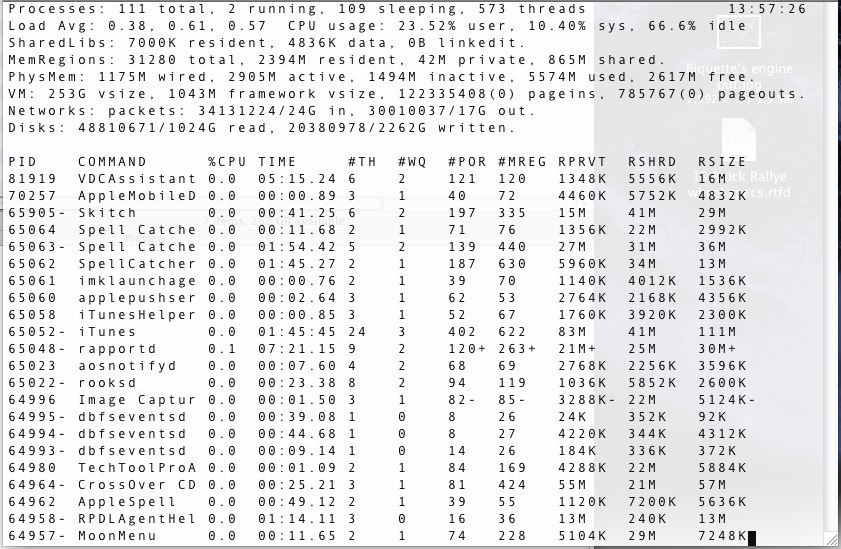


If you look at the 5th line from the top you'll see it starts with the phrase PhysMem:.  The grep command is getting me just that line.  After I have that line, I use AppleScript to break the line up into what AppleScript considers to be words.  I assume there is some whitespace that is counted as words.  The number I'm trying to grab is the 5574M in that third line just before the word: used:.  Admittedly this was a rather kludgy way to get that number, but AppleScript doesn't have anything like this available and I added this feature to WC Status Growler in the dark days before we knew WeatherCat was coming.  So anything to keep the community alive was a good thing.

Unless I can find out how top changed or get some sort of equivalent UNIX way to get the memory used under Mavericks, WC Status Growler won't be able to report the the total amount of memory used for anyone running OS-10.9.

Sorry gang, wish I could help more, but this is how my life has been going these days.  Boy, 2013 has been a year with a 13 in it - all year long . . . .   [banghead]

Edouard

P.S. Just looking at the error message, it looks to me that changing the 10 in this line of WC Status Growler might work:

set freeMemory to item 10 of freeMemoryData

To the number 2 just might work:

set freeMemory to item 2 of freeMemoryData

You could give it a try and see what happens.

Steve

  • Global Moderator
  • Storm
  • *****
  • Posts: 1589
    • DW8454
    • KOHAVON11
    • Avon Weather
  • Station Details: Davis Wireless VP2 Plus w/24 hr FARS, 2023 Mac mini M2 Pro, 32GB RAM, Mac OS 15, WeatherCat 3.3
Re: Mac OS X 9.6 "Mavericks" shows error in Edouard's Status Growler script
« Reply #2 on: October 24, 2013, 12:15:44 AM »
Thanks for taking a peek, Edouard. Here's the Top output on OS X 10.9

Code: [Select]
Processes: 222 total, 2 running, 6 stuck, 214 sleeping, 1039 threads                                        19:13:27
Load Avg: 1.45, 1.69, 1.64  CPU usage: 12.18% user, 4.96% sys, 82.84% idle
SharedLibs: 1324K resident, 0B data, 0B linkedit.
MemRegions: 58210 total, 3677M resident, 155M private, 683M shared. PhysMem: 8880M used (1623M wired), 7483M unused.
VM: 532G vsize, 1026M framework vsize, 0(0) swapins, 0(0) swapouts.
Networks: packets: 26743101/27G in, 62712979/71G out. Disks: 1091198/58G read, 1259574/54G written.

PID    COMMAND      %CPU TIME     #TH  #WQ  #PORT #MREG MEM    RPRVT  PURG   CMPRS  VPRVT  VSIZE  PGRP  PPID
31550  mdworker     0.0  00:00.02 4    0    51    167   2364K  1220K  0B     0B     45M    2410M  31550 269
31548  top          9.7  00:02.62 1/1  0    23    37    5128K  4900K  0B     0B     44M    2403M  31547 31547
31547  login        0.0  00:00.01 2    0    30    46    944K   632K   0B     0B     53M    2411M  31547 950
31543  bash         0.0  00:00.00 1    0    19    33    616K   452K   0B     0B     36M    2403M  31543 31541
31541  login        0.0  00:00.41 2    0    30    46    936K   632K   0B     0B     53M    2411M  31541 950
31535  mdworker     0.0  00:00.10 4    0    54    184   5780K  4464K  0B     0B     47M    2419M  31535 186
31534  mdworker     0.1  00:00.09 4    0    54    183+  5332K+ 4068K+ 0B     0B     48M+   2420M+ 31534 186
31509  syncdefaults 0.0  00:00.29 4    0    88-   68-   5420K- 4232K- 0B     0B     54M-   2436M- 31509 186
31480  com.apple.We 0.7  00:06.81 10   1    192   1000- 88M-   84M-   8192B  0B     443M-  3687M- 31480 1
31468  com.apple.We 0.5  00:05.06 11   2    206   901   70M    66M-   380K   0B     424M-  3697M  31468 1
31271  com.apple.hi 0.0  00:00.01 2    0    30    42    1028K  480K   0B     0B     45M    2411M  31271 1
31261  mdworker     0.2  00:04.38 3    0    52    1771+ 24M+   22M+   0B     0B     60M+   2431M+ 31261 186
31254  ocspd        0.0  00:00.05 1    0    23    56    1456K  908K   0B     0B     13M    2403M  31254 1
31253  cookied      0.0  00:00.06 2    0    53    56    5880K  3492K  0B     0B     15M    2413M  31253 186
30823  com.apple.iC 0.0  00:00.36 5    0    87    78    3736K  2956K  0B     0B     54M    2436M  30823 1
18127  Messages     0.0  00:06.56 8    0    275-  837-  33M-   26M-   1880K  0B     226M-  3625M- 18127 186
17642- Python       0.1  00:46.53 14   0    58    293   38M    37M    0B     0B     70M    653M   778   778
17623- LogMeIn      0.3  00:38.61 25   1    97    130   6372K  5068K  0B     0B     62M    662M   17623 1
17615- LMIGUIAgent  0.0  00:00.68 6    0    233   204   3628K  2068K  0B     0B     51M    662M   17615 186
17609- LogMeInGUI   0.0  00:11.95 7    0    137   264   7104K  5236K  0B     0B     56M    679M   17609 186
16126  helpd        0.0  00:00.03 2    0    42    46    1184K  592K   0B     0B     45M    2434M  16126 186
16022  TextExpander 0.0  00:00.19 3    0    140   214   4748K  3576K  8192B  52K    54M    2477M  16022 186
16020  TextExpander 0.0  00:01.83 6    0    314-  450-  28M-   14M-   60K    52K    89M-   3567M- 16020 186
15209  cfprefsd     0.0  00:01.85 2    1    173-  130-  5336K- 5084K- 0B     0B     49M-   2416M- 15209 186
15202  cfprefsd     0.0  00:02.05 3    2    201-  60-   1372K- 1136K- 0B     0B     45M-   2412M- 15202 1
13771  applet       0.0  00:42.48 3    1    115   240   10M    7392K  0B     0B     42M    2484M  13771 186
13770  2BUA8C4S2C.c 0.0  00:06.22 6    0    199   388   18M    13M    0B     52K    50M    2519M  13770 186
13659  PTPCamera    0.0  00:00.90 5    0    146   200   4624K  3316K  0B     0B     55M    2476M  13659 186
12276  com.apple.cm 0.0  00:00.00 2    0    25    40    920K   372K   0B     12K    36M    2402M  12276 1
12229  com.apple.Ch 0.0  00:00.04 2    0    45    47    1692K  1112K  0B     4096B  53M    2434M  12229 1
12228  ScopedBookma 0.0  00:00.08 2    1    40    52    3304K  2864K  0B     0B     47M    2437M  12228 186
12184  com.apple.ge 0.0  00:08.59 5    0    88-   67-   9644K- 9048K- 0B     360K   56M-   2438M- 12184 1
11549  Alfred 2     0.0  00:00.45 3    0    146   219   6960K  5032K  0B     0B     72M    2495M  11549 186
10781  com.apple.We 0.0  00:18.65 4    0    118-  330-  24M-   19M-   0B     0B     49M-   3477M- 10781 1
10779  Safari       1.0  02:28.61 21   2    657   2134  164M+  145M+  392K   204K   588M+  3867M  10779 186
9336   EscrowSecuri 0.0  00:00.19 3    0    141   180   3916K  2376K  0B     0B     53M    2471M  9336  186
9238   periodic-wra 0.0  00:00.00 2    1    29    38    424K   256K   0B     8192B  45M    2411M  9238  1
4025   com.apple.au 0.0  00:00.12 2    1    44    55    1496K  816K   0B     8192B  53M    2413M  4025  1
4007   com.apple.au 0.0  00:00.01 2    1    28    46    1160K  600K   0B     8192B  45M    2412M  4007  1
3959   com.apple.We 0.0  00:10.36 10   0    240-  664-  57M-   54M-   10M    68K    382M-  3684M- 3959  1
3950   applet       0.0  00:27.52 2    0    108   228   10M    8136K  0B     0B     50M    2479M  3950  186
3947   Growl        0.0  00:08.52 7    2    191   318   16M    25M    0B     0B     104M   2537M  3947  186
3924   Activity Mon 0.1  00:31.48 4    1    179   338   18M    14M    0B     52K    73M    2529M  3924  186
3783   usbmuxd      0.0  01:49.41 3    0    52    47    1876K  1432K  0B     4096B  63M    2422M  3783  1
3749   iTunesHelper 0.0  00:01.46 2    0    69    176   6860K  5512K  0B     348K   57M    2450M  3749  186
3626   com.apple.Co 0.0  00:00.11 2    1    45    55    1488K  824K   0B     12K    45M    2434M  3626  1
3330-  dbfseventsd  0.0  00:36.44 1    0    7     26    112K   44K    0B     0B     116K   583M   524   3329
3329-  dbfseventsd  0.0  00:52.73 1    0    7     27    4308K  4232K  0B     0B     12M    591M   524   3328
3328-  dbfseventsd  0.0  00:17.69 1    0    14    26    344K   232K   0B     0B     5288K  583M   524   524
1948   LaterAgent   0.0  00:00.29 3    0    133   177   3332K  2576K  0B     0B     54M    2471M  1948  186
1851   DiskUnmountW 0.0  00:00.03 2    1    34    49    820K   448K   0B     12K    45M    2411M  1851  186
1838   check_afp    0.0  00:00.32 4    0    44    41    740K   508K   0B     12K    53M    2411M  1838  1
1622   com.apple.hi 0.0  00:00.01 2    0    30    42    1044K  496K   0B     16K    45M    2411M  1622  1
1619   FreeMemory   0.0  00:48.54 5    0    187-  258-  10M-   7364K- 0B     52K    60M-   2494M- 1619  186
1167   emond        0.0  00:04.11 3    1    47    80    6320K  5696K  0B     0B     59M    2441M  1167  1
1041   applet       0.0  00:01.19 2    0    109   229   11M    8780K  0B     4096B  61M    2489M  1041  186
1035   applet       0.0  11:45.08 3    1    110   219   7592K  5616K  0B     4096B  48M    2476M  1035  186
1018   System Event 0.0  00:05.81 3    0    133   235   7988K  6616K  0B     0B     82M    2500M  1018  186
1003-  WeatherCat   5.1  02:48:33 29   3    402   1654  262M   228M   4728K  180K   317M   1023M  1003  186
964    Python       0.0  00:07.77 1    0    7     130   2428K  1500K  0B     0B     1636K  2409M  960   961
963    Python       0.0  00:07.95 1    0    7     130   2832K  1924K  0B     0B     2060K  2409M  960   961
962    Python       0.0  00:01.55 1    0    7     130   2252K  1488K  0B     0B     1624K  2409M  960   961
961    Python       0.0  00:00.23 1    0    15    130   8056K  424K   0B     0B     516K   2409M  960   96

I'll try substituting 2 for 10 as you suggested, next.

Steve

UPDATE: I changed the 10 to a 2 an hour or so ago, and haven't had a single pop-up since. Station Status seems OK, and no other problems seem evident. Edouard, you are indeed a wizard! :)

Thanks!
Steve
Steve - Avon, Ohio, USA


CWOP: DW8454 - WU: KOHAVON11 - AWEKAS
PWSweather - WeatherCloud - Facebook

elagache

  • Global Moderator
  • Storm
  • *****
  • Posts: 6649
    • DW3835
    • KCAORIND10
    • Canebas Weather
  • Station Details: Davis Vantage Pro-2, Mac mini (2018), macOS 10.14.3, WeatherCat 3
One more question for a fix (Re: Mac OS X 9.6 error in 'Status Growler')
« Reply #3 on: October 24, 2013, 10:04:00 PM »
Howdy Steve and WeatherCat AppleScript fans,

Okay, this problem is looking like a relatively easy fix.

Thanks for taking a peek, Edouard. Here's the Top output on OS X 10.9

. . . . .

I'll try substituting 2 for 10 as you suggested, next.

Steve

UPDATE: I changed the 10 to a 2 an hour or so ago, and haven't had a single pop-up since. Station Status seems OK, and no other problems seem evident. Edouard, you are indeed a wizard! :)

Hurray!!  I was hoping this wouldn't be too painful.  Thanks Steve for the example of top.  That does confirm that switching the value from 10 to 2 will work.

As long as I'm going to fix this, I might has well do this the proper way and have the AppleScript adjust itself depending on the version of OS-X it is running on.  To do that need to confirm one more thing.  Does Mavericks return the OS-X version like in the past?

Do to that could somebody running Mavericks run the tiny AppleScript attached to this posting or cut and paste this snippet of AppleScript into the AppleScript editor:

Code: [Select]
local OSXversion
tell application "Finder"
set OSXversion to version
end tell
display dialog "OS-X version number is: " & OSXversion
OSXversion

It should give something like 10.9.0 as the OSX version number.  If it does then I can easily tweak WC Status Growler to run on any version of OS-X that WeatherCat runs on.

Cheers, Edouard  [cheers1]

Steve

  • Global Moderator
  • Storm
  • *****
  • Posts: 1589
    • DW8454
    • KOHAVON11
    • Avon Weather
  • Station Details: Davis Wireless VP2 Plus w/24 hr FARS, 2023 Mac mini M2 Pro, 32GB RAM, Mac OS 15, WeatherCat 3.3
Re: Mac OS X 9.6 "Mavericks" shows error in Edouard's Status Growler script
« Reply #4 on: October 25, 2013, 02:23:49 AM »


After clicking OK, I get:
Steve - Avon, Ohio, USA


CWOP: DW8454 - WU: KOHAVON11 - AWEKAS
PWSweather - WeatherCloud - Facebook

elagache

  • Global Moderator
  • Storm
  • *****
  • Posts: 6649
    • DW3835
    • KCAORIND10
    • Canebas Weather
  • Station Details: Davis Vantage Pro-2, Mac mini (2018), macOS 10.14.3, WeatherCat 3
Test version in Steve's mailbox (Re: Mac OS X 9.6 error in 'Status Growler')
« Reply #5 on: October 25, 2013, 08:31:06 PM »
Howdy Steve and WeatherCat AppleScript fans,

I just sent Steve via email a copy of an updated version of WC Status Growler that should work on all versions of OS-X that WeatherCat supports.  If Steve reports that all is well, I'll update the documentation and release a new version of my AppleScripts.

Cheers, Edouard  [cheers1]