Hi Steve and WeatherCat AppleScript fans,
Just a notice for those of you who run Edouard's WeatherCat Apple Scripts. I updated my iMac to Mac OS X 10.9 Mavericks yesterday. Soon after relaunching all the apps, I found the following dialog box pop up.

I think it is part of the script that uses Activity Monitor to gram the system info for the Station Status page.
Unfortunately while you are close Steve, the way my AppleScript gets data is via a UNIX command line utility called '
top.' The only way I could repair the script for Mavericks would be if some of you folks who already have upgraded or can upgrade could give me some data. I assume I'll eventually upgrade one computer in the house to Mavericks, but I don't do any major OS upgrades for at least a few weeks so that other folks have the upgrade headaches first.
In the meantime, if somebody could get me a screenshot of the OS-10.9
top utility running in a terminal window, perhaps I could make a good guess about what has changed. Here is what it looks like on Snow Leopard:
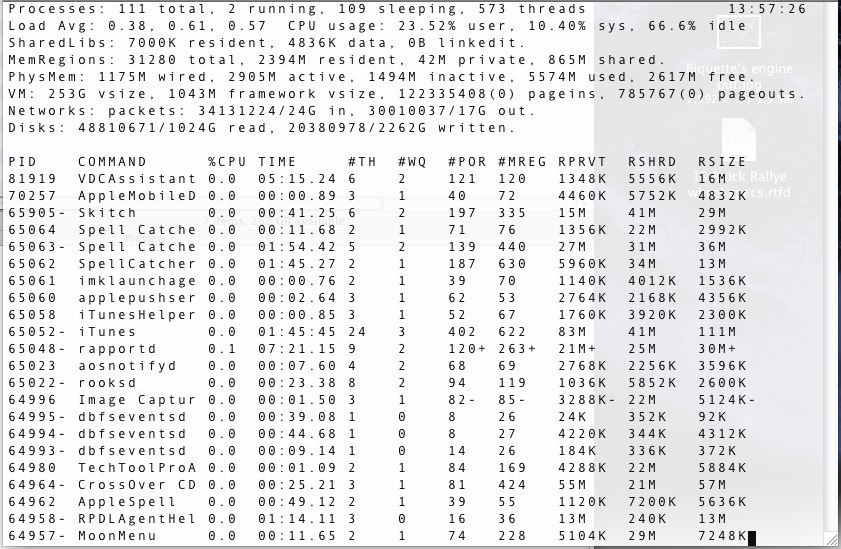
If you look at the 5th line from the top you'll see it starts with the phrase
PhysMem:. The
grep command is getting me just that line. After I have that line, I use AppleScript to break the line up into what AppleScript considers to be words. I assume there is some whitespace that is counted as words. The number I'm trying to grab is the
5574M in that third line just before the word:
used:. Admittedly this was a rather kludgy way to get that number, but AppleScript doesn't have anything like this available and I added this feature to
WC Status Growler in the dark days before we knew WeatherCat was coming. So anything to keep the community alive was a good thing.
Unless I can find out how
top changed or get some sort of equivalent UNIX way to get the memory used under Mavericks,
WC Status Growler won't be able to report the the total amount of memory used for anyone running OS-10.9.
Sorry gang, wish I could help more, but this is how my life has been going these days.
Boy, 2013 has been a year with a
13 in it -
all year long . . . .
![[banghead]](https://athena.trixology.com/Smileys/default/banghead.gif "Bang Head")
Edouard
P.S. Just looking at the error message, it looks to me that changing the
10 in this line of
WC Status Growler might work:
set freeMemory to item 10 of freeMemoryDataTo the number
2 just might work:
set freeMemory to item 2 of freeMemoryDataYou could give it a try and see what happens.


