Author Topic: Past days data along side current data for graphs???  (Read 5689 times)

elagache

  • Global Moderator
  • Storm
  • *****
  • Posts: 6661
    • DW3835
    • KCAORIND10
    • Canebas Weather
  • Station Details: Davis Vantage Pro-2, Mac mini (2018), macOS 10.14.3, WeatherCat 3
Past days data along side current data for graphs???
« on: July 15, 2022, 09:50:53 PM »
Dear WeatherCat faithful,

Okay, this is most likely wishful thinking at best, but I wanted to toss out the idea for community consideration and before I forget it.  Perhaps, there aren't many folks who would find it useful anyway so it is a still-born idea.  Good or bad here is the issue.

At least at my location, the forecast high temperatures aren't very reliable.  The range of errors can be so extreme that on a day when we should be able to keep the windows open, instead we need to run the air conditioner for an extended period.  I've started to try to imagine in my mind what the temperature will be based on previous conditions and the National Weather Service discussion.  To help me, I've used the WeatherCat Controller Window to quickly jump between yesterday's and current temperature.  That gives me an idea of how similar the current weather is to the previous day.

That could be easily seen if you could graph the temperature of the previous day and could watch the current temperature compared to that.  Here is an example of a similar idea from the California ISO:


In this case the estimates of power used from the day before are overlaid behind the actual electrical demand.  On a normal day, these should be almost on top of each other.  Returning to my temperature example, if the current temperature is close to where it was the previous day, the weather is most likely going to be similar. 

Would folks find this sort of comparative graph worth implementing in WeatherCat someday?  Stu is hopefully busy at the moment, so it won't happen anytime soon.  Is there enough interest for Stu to add it to the potential to-do list?

Let's hear from the WeatherCat faithful!

Cheers, Edouard 

Blicj11

  • Storm
  • *****
  • Posts: 4061
    • EW3808
    • KUTHEBER6
    • Timber Lakes Weather
  • Station Details: Davis Vantage Pro2 Plus | WeatherLinkIP Data Logger | iMac (2019), 3.6 GHz Intel Core i9, 40 GB RAM, macOS Sonoma 14.8.3 | WeatherCat 3.3 | Supportive Wife
Re: Past days data along side current data for graphs???
« Reply #1 on: July 15, 2022, 11:36:58 PM »
I like it. Easy comparison to see at a glance.
Blick


xairbusdriver

  • Storm
  • *****
  • Posts: 3131
Re: Past days data along side current data for graphs???
« Reply #2 on: July 16, 2022, 07:19:17 PM »
Can’t get to my computer or the WC Custom Graph settings. I assume there is not even a ‘Temp’ | ‘Yesterday’ option. I have graphs using ‘Lastweek’ values. I thing your quest could be created with a modified SQL query… Temp, Hour, hour-24,… or some such. We know the data are there, the trick is designing the query ( and enabling the user to access it in a foolproof whay). cmu:-)
THERE ARE TWO TYPES OF COUNTRIES
Those that use metric = #1 Measurement system
And the United States = The Banana system

elagache

  • Global Moderator
  • Storm
  • *****
  • Posts: 6661
    • DW3835
    • KCAORIND10
    • Canebas Weather
  • Station Details: Davis Vantage Pro-2, Mac mini (2018), macOS 10.14.3, WeatherCat 3
DIY version. (Re: Past days data along side current data for graphs???)
« Reply #3 on: July 18, 2022, 10:31:43 PM »
Dear WeatherCat faithful,

 [wink] . . . . So you are the impatient type and want this sort of graph now, now, now now!! . . . . .

. . . .  lol(1)

Well no, you can't have your wish come true.  However, if you are willing to spare a synthetic channel and are willing cut and paste some AppleScript code, you can actually come very close with the very copy of WeatherCat you have installed on your Mac now.

As soon as posted this, my scheming mind pondered what might be done with the WeatherCat STAT tag.  As difficult as it was for an excessively proud man to do, there was no alternative but to crack open the WeatherCat manual and see what tricks were available.  As it turns out Stu provided da' very thing in a 24HRSAGO period you can use with the STAT tag.  You can read up on all the nifty things you can do with the STAT tag starting on page 209 of the current WeatherCat manual.  All I did then was to create a query that returned the temperature exactly 24 hours ago and used the AppleScript interface to the STAT tag to get the value of interest.  The AppleScript code is below.

Code: [Select]
-- Channel to retrieve temperature of 24 hours ago.
set Query to "STAT$TEMPERATURE:24HRSAGO$"
set result to QueryResult

I had to "repurpose" one of my synthetic channels which now looked like this:
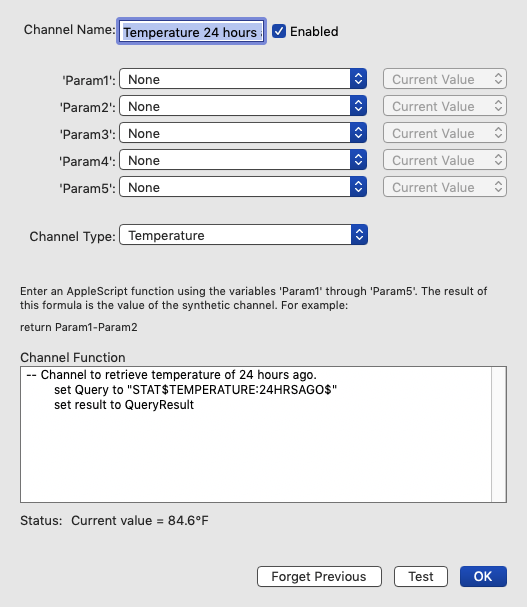


Don't forget to set the channel type to temperature otherwise your graph won't work correctly.

Now all I needed to do is create a new custom graph which looks like this:
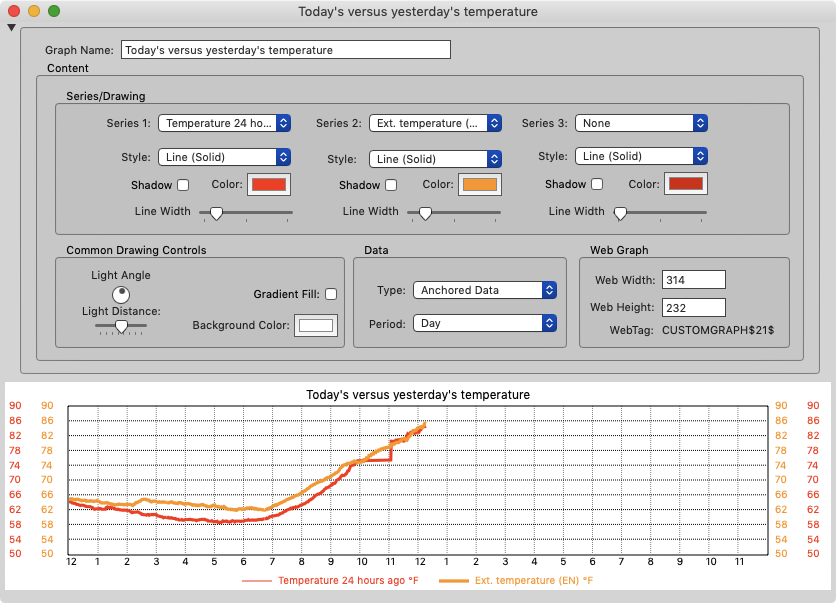


The first item to be graphed is the synthetic channel that you just created.  You will have to scroll down to find it as the bottom of possible data sources.  The second data to be graphed is our usual external temperature.  The result will be graphs like this:
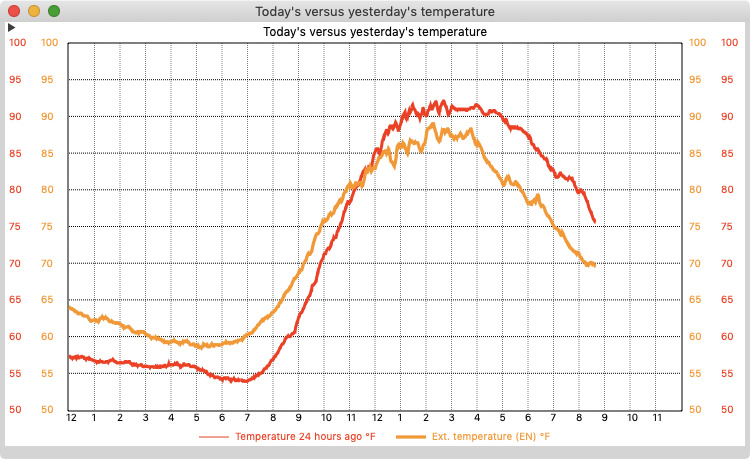


Now it isn't quite what I suggested on 2 counts.  It doesn't show you the complete temperature curve for the previous day, only what the previous day had been like thus far in the present day.  Also, you cannot be certain the two graphs will be displayed on the same scale.  However even with those limitations, I have found this DIY version extremely useful.

My screenshot of the last graph was taken shortly before 9pm.  As you can see, the day started considerably hotter than the day before.  The overnight lows were around 60° F (16° C) instead of 55° F (13° C).  However, at about 11:30am, the curves crossed.  The peak temperature on the previous day was 92° F (33° C).  The day when this graph was produced peak was a bit cooler at 89° F (32° C).  By the time I went to bed things had cooled off much more rapidly then the previous day and I could open the house instead of running the air conditioner.

I've only had it running a few days, but I'm already impressed at how useful it is.  The big virtue is that we all have some idea of what the conditions were the day before.  This graph quantifies that and helps you make good decisions about heating and cooling compared to how you had handled the situation the day before.  Since that is fresh in your mind, it gives you a leg up on what to do.

So if you have a spare synthetic channel (or one you would be will change over) and spend a lot of time fussing with your HVAC system,  try making yourself this graph.  I think you'll like it!  :)

Cheers, Edouard


Blicj11

  • Storm
  • *****
  • Posts: 4061
    • EW3808
    • KUTHEBER6
    • Timber Lakes Weather
  • Station Details: Davis Vantage Pro2 Plus | WeatherLinkIP Data Logger | iMac (2019), 3.6 GHz Intel Core i9, 40 GB RAM, macOS Sonoma 14.8.3 | WeatherCat 3.3 | Supportive Wife
Re: Past days data along side current data for graphs???
« Reply #4 on: July 19, 2022, 12:23:45 AM »
This is pretty cool. I had a synthetic channel that didn't do what I hoped it would so I used it, followed your examples, and am enjoying the fruits of your labor. The synthetic channel only starts tracking when it is first saved, so my graph isn't much to look at yet, but it will look great starting tomorrow. Excellent use of your brain whilst your nose heals up. Thanks for sharing!
Blick


xairbusdriver

  • Storm
  • *****
  • Posts: 3131
Re: Past days data along side current data for graphs???
« Reply #5 on: July 19, 2022, 01:46:27 AM »
Thanks, Edouard! Looks like all the brain cells you lost in your old nose successfully moved north!! cmu:-)
THERE ARE TWO TYPES OF COUNTRIES
Those that use metric = #1 Measurement system
And the United States = The Banana system

elagache

  • Global Moderator
  • Storm
  • *****
  • Posts: 6661
    • DW3835
    • KCAORIND10
    • Canebas Weather
  • Station Details: Davis Vantage Pro-2, Mac mini (2018), macOS 10.14.3, WeatherCat 3
Dear WeatherCat faithful,

You are most welcome Blick, and X-Air!  I do hope others will give this a try.  It is certainly very useful in situations where you switch between various cooling strategies.  It might not be all that useful in places where there is no choice but run the A/C most of the time in the summer.  But even in those locales this graph should become useful in the mid-season. 

Cheers, Edouard

Blicj11

  • Storm
  • *****
  • Posts: 4061
    • EW3808
    • KUTHEBER6
    • Timber Lakes Weather
  • Station Details: Davis Vantage Pro2 Plus | WeatherLinkIP Data Logger | iMac (2019), 3.6 GHz Intel Core i9, 40 GB RAM, macOS Sonoma 14.8.3 | WeatherCat 3.3 | Supportive Wife
Re: Past days data along side current data for graphs???
« Reply #7 on: July 26, 2022, 10:20:28 PM »
Here is what my graph looks like today (with the WeatherCat floating graphic superimposed).

Thanks again Edouard.
Blick


elagache

  • Global Moderator
  • Storm
  • *****
  • Posts: 6661
    • DW3835
    • KCAORIND10
    • Canebas Weather
  • Station Details: Davis Vantage Pro-2, Mac mini (2018), macOS 10.14.3, WeatherCat 3
Dear Blick and WeatherCat do-it-yourself HVAC types,

Here is what my graph looks like today (with the WeatherCat floating graphic superimposed).

I'm glad that you are finding it helpful!  It is definitely giving me a head's up on what to expect during the day.  At the moment we are a typical California coastal weather pattern.  The high pressure in the 4-corners region is keeping things hot in the interior.  The sea surface temperatures are still cool.  So what dictates our weather is now much the winds blow from the ocean.  Comparing today's temperature to yesterday's gives me a good idea of how effective the sea breeze is acting as a "natural air conditioner."  That allows me to anticipate whether or not the central air conditioning will be needed.

It will be interesting to see how useful this graph is under other weather conditions.  We are headed toward the dreaded off-shore wind conditions when hot dry winds blow from the deserts across to the coast.  It will be an interesting test of this graph.

Cheers, Edouard

Blicj11

  • Storm
  • *****
  • Posts: 4061
    • EW3808
    • KUTHEBER6
    • Timber Lakes Weather
  • Station Details: Davis Vantage Pro2 Plus | WeatherLinkIP Data Logger | iMac (2019), 3.6 GHz Intel Core i9, 40 GB RAM, macOS Sonoma 14.8.3 | WeatherCat 3.3 | Supportive Wife
Re: Past days data along side current data for graphs???
« Reply #9 on: October 05, 2022, 06:23:32 AM »
I am amazed at how frequently the temperature patterns for two consecutive days are so close. This is my graph comparing today to yesterday. Thanks, again, for sharing this little synthetic channel tip.
Blick


xairbusdriver

  • Storm
  • *****
  • Posts: 3131
Re: Past days data along side current data for graphs???
« Reply #10 on: October 05, 2022, 03:00:10 PM »
Quote
the temperature patterns for two consecutive days are so close.
That's because California weather is so boring!! [banghead] cmu:-)
THERE ARE TWO TYPES OF COUNTRIES
Those that use metric = #1 Measurement system
And the United States = The Banana system

elagache

  • Global Moderator
  • Storm
  • *****
  • Posts: 6661
    • DW3835
    • KCAORIND10
    • Canebas Weather
  • Station Details: Davis Vantage Pro-2, Mac mini (2018), macOS 10.14.3, WeatherCat 3
Steady weather. (Re: Past days data along side current data for graphs???)
« Reply #11 on: October 06, 2022, 10:43:56 PM »
Dear Blick, X-Air, and WeatherCat close observers of the weather,

I am amazed at how frequently the temperature patterns for two consecutive days are so close. This is my graph comparing today to yesterday. Thanks, again, for sharing this little synthetic channel tip.

That is true if the weather is relatively steady.  For example, right now we are seeing a very gradual heat-wave.  So each day the pattern is indeed very close, but the high climbs a bit further and the overnight lows are also higher than for the previous day.

These graphs can be very useful when the weather is extremely different from the previous day.  I took some window captures during the California heat wave during the first full week of September that make the point.  Here is the graph from Sunday, Sept. 4th:


The overall pattern is similar, but the temperatures start higher and remain higher later in the day.  It was the beginning of the discomfort that the heat wave would represent.  In the middle of the heat wave there was a roughly repeated pattern.  Here is the following day Monday, 9/5:


However, in the middle of the heat wave we got a brief respite.  On Tuesday, the 6th it started to cool down earlier in the day:


The rest of the week was unbearably hot until finally the heat wave broke on Friday, the 9th:


When I get up each morning, I have the early morning temperature trends and that (plus the current forecast) gives me a good idea of what to expect for the rest of the day.

Honestly, I wonder how I lived without it!

Cheers, Edouard

elagache

  • Global Moderator
  • Storm
  • *****
  • Posts: 6661
    • DW3835
    • KCAORIND10
    • Canebas Weather
  • Station Details: Davis Vantage Pro-2, Mac mini (2018), macOS 10.14.3, WeatherCat 3
Frontal passage. (Re: Past days data along side current data for graphs???)
« Reply #12 on: October 29, 2022, 10:09:24 PM »
Dear WeatherCat users who keep a close eye on the weather,

The main reason why yesterday's temperature will often resemble today's is because solar heating which changes slowly over the seasons.  However, there are exceptions and they are insightful as far as what the weather is doing.  Yesterday, during the mid-afternoon I noticed this abrupt dip in temperatures:


It coincided with the expected passage of a cold dry front.  This can be easily seen on even this small animated gif of the same period:


These images are available from this NOAA website, and in this case, feature the GOES-West satellite imagery:

https://www.star.nesdis.noaa.gov/GOES/sector.php?sat=G17&sector=psw

WeatherCat simply automates the sort of data collection that scientists have been doing for literally centuries.  It is a credit to those early meteorologists who worked out how high and low pressure systems in the atmosphere worked generations before we could see the process from space.

Cheers, Edouard

elagache

  • Global Moderator
  • Storm
  • *****
  • Posts: 6661
    • DW3835
    • KCAORIND10
    • Canebas Weather
  • Station Details: Davis Vantage Pro-2, Mac mini (2018), macOS 10.14.3, WeatherCat 3
Companion CTW. (Re: Past days data along side current data for graphs???)
« Reply #13 on: July 31, 2023, 10:38:52 PM »
Dear WeatherCat faithful,

As already mentioned, I don't know how I lived without being able to compare today's temperature to yesterday's.  However there is one problem with a graph, It is difficult to quantify exactly what is the difference between yesterday and today.  I have a Custom Text Window with information about cooling the house.  Why this idea didn't strike me sooner I don't know, but I realized I had information being displayed from a synthetic channel.  In my case the current difference between the inside and outside temperature.  I was even displaying the 1 hour delta.  So I could do exactly the same thing for the temperature a day ago.  The way I did this is using a STAT$ tag that looks like this:

Temperature 24 hrs. ago: STAT$SYN4:CURRENT$˚ F (STAT$SYN4:DELTAHRS(1)$)

I added it to my Custom Text Window and it looks like this:


I've only had this enhancement for a few hours and I am already very pleased.  I could immediately see that today was going to be cooler than yesterday and could make more precise judgements because I could compare quantitatively what the curves on the graph were showing me.

I've attached my revised Custom Text Window to this posting, but you probably would need to at least change the number of the Synthetic Channel to your implementation of yesterday's temperature.  You could also use the text of the STAT$ shown above to revise any Custom Text Window where you would want to include this information.

Another obvious enhancement would be to display the difference in temperature between today and yesterday.  However, I have all 5 Synthetic Channels doing things I find desirable and I couldn't think of any other way to do that.  It is easy enough to do the math as needed.

Hopefully a few other WeatherCatters will find this useful!

Edouard   


xairbusdriver

  • Storm
  • *****
  • Posts: 3131
Re: Past days data along side current data for graphs???
« Reply #14 on: August 01, 2023, 04:13:39 AM »
I wonder if Stu even knew how useful the data collected would be when he developed the app. 👏  [cheer] ThU5:-)
THERE ARE TWO TYPES OF COUNTRIES
Those that use metric = #1 Measurement system
And the United States = The Banana system