Author Topic: FTP anomoly  (Read 12259 times)

geoffmurray

  • Gentle Breeze
  • **
  • Posts: 35
    • ITASMANI96
    • Geoff Murray Wilderness and Landscape Photography
  • Station Details: Davis vantage Pro 2,wireless remote anemometer, non Davis wireless logger to iMac 27" 3.4Ghz i7 16Gb RAM SSD HD
FTP anomoly
« on: April 30, 2014, 02:56:15 PM »
Hi, New user here and not all that ftp savvy. I am initially just trying to upload a simple web page to my server. The updated files are going into my "save folder" on my iMac but they are not being uploaded via ftp. I believe the Set Path in WC is correct. I can enter my ftp details into the Custom web pages section and test with a successful result and yet when I enter the same log in details in the simple web pages option the test fails. Ideas? The ftp user username is geoff and the ftp address that I am using is ftp://geoffmurray.com/ The WCWeb file is in the root folder.
Geoff

geoffmurray

  • Gentle Breeze
  • **
  • Posts: 35
    • ITASMANI96
    • Geoff Murray Wilderness and Landscape Photography
  • Station Details: Davis vantage Pro 2,wireless remote anemometer, non Davis wireless logger to iMac 27" 3.4Ghz i7 16Gb RAM SSD HD
Re: FTP anomoly
« Reply #1 on: April 30, 2014, 03:13:01 PM »
I can upload the files manually and they show here http://www.geoffmurray.com/WCWeb/index.html but they aren't updating because of the ftp failure.
Geoff

elagache

  • Global Moderator
  • Storm
  • *****
  • Posts: 6686
    • DW3835
    • KCAORIND10
    • Canebas Weather
  • Station Details: Davis Vantage Pro-2, Mac mini (2018), macOS 10.14.3, WeatherCat 3
Most likely an FTP syntax issue. (Re: FTP anomoly)
« Reply #2 on: April 30, 2014, 09:55:28 PM »
Dear Geoff and WeatherCat fans,

Since these are your first postings, we owe you a proper welcome . . . .

Welcome to the WeatherCat forum!!

Once you get your station up and running feel free to introduce yourself in our new member introductions section:

http://athena.trixology.com/index.php?board=8.0

Hi, New user here and not all that ftp savvy. I am initially just trying to upload a simple web page to my server. The updated files are going into my "save folder" on my iMac but they are not being uploaded via ftp. I believe the Set Path in WC is correct. I can enter my ftp details into the Custom web pages section and test with a successful result and yet when I enter the same log in details in the simple web pages option the test fails. Ideas? The ftp user username is geoff and the ftp address that I am using is ftp://geoffmurray.com/ The WCWeb file is in the root folder.
Geoff

I'm not sure, but it sounds like you aren't providing the complete path in the WeatherCat preferences.  Take a look at page 116 in the WeatherCat manual.  Also the WeatherCat Wiki describes some common problem with getting WeatherCat to upload to FTP:

http://wiki.trixology.com/index.php/Troubleshooting_FTP_connection_problems

My suspicion is that you need to provide the following FTP upload path to get the files to show up:

Code: [Select]
ftp://ftp.geoffmurray.com/WCWeb
Your completed preference pane in WeatherCat should look similar to this:
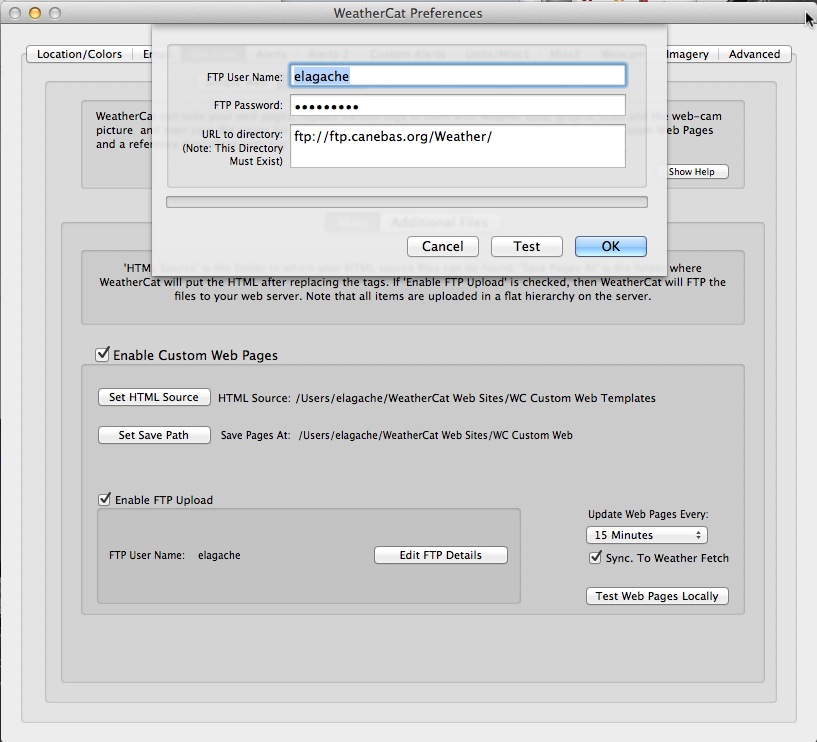


Let us know if that indeed gets you unstuck and once more welcome to the WeatherCat forum!

Cheers, Edouard  [cheers1]

geoffmurray

  • Gentle Breeze
  • **
  • Posts: 35
    • ITASMANI96
    • Geoff Murray Wilderness and Landscape Photography
  • Station Details: Davis vantage Pro 2,wireless remote anemometer, non Davis wireless logger to iMac 27" 3.4Ghz i7 16Gb RAM SSD HD
Re: FTP anomoly
« Reply #3 on: May 02, 2014, 02:03:32 AM »
Hi Edouard,
Thanks for the nice greeting :-)
What I don't understand is why the custom web ftp details work and yet the simple web details don't. I would have thought that they would be indentical. Below is my current conditions loaded to my website but with the files uploaded manually.
Next is a successful test through ftp and the custom web, followed by a failed test with simple web, plus a screenshot of my ftp program.
Geoff

geoffmurray

  • Gentle Breeze
  • **
  • Posts: 35
    • ITASMANI96
    • Geoff Murray Wilderness and Landscape Photography
  • Station Details: Davis vantage Pro 2,wireless remote anemometer, non Davis wireless logger to iMac 27" 3.4Ghz i7 16Gb RAM SSD HD
Re: FTP anomoly
« Reply #4 on: May 02, 2014, 02:06:01 AM »
Plus a screenshot of my ftp client.
Geoff

geoffmurray

  • Gentle Breeze
  • **
  • Posts: 35
    • ITASMANI96
    • Geoff Murray Wilderness and Landscape Photography
  • Station Details: Davis vantage Pro 2,wireless remote anemometer, non Davis wireless logger to iMac 27" 3.4Ghz i7 16Gb RAM SSD HD
Re: FTP anomoly
« Reply #5 on: May 02, 2014, 11:29:34 AM »
I tried using the SeaMonkey template using Custom Web and it was very easy and straightforward...
http://www.geoffmurray.com/weather/index.html
Geoff

elagache

  • Global Moderator
  • Storm
  • *****
  • Posts: 6686
    • DW3835
    • KCAORIND10
    • Canebas Weather
  • Station Details: Davis Vantage Pro-2, Mac mini (2018), macOS 10.14.3, WeatherCat 3
Could WCWeb had a permissions issue? (Re: FTP anomoly)
« Reply #6 on: May 02, 2014, 09:38:11 PM »
Dear Geoff and WeatherCat fans,

I tried using the SeaMonkey template using Custom Web and it was very easy and straightforward...

Glad you like them.  Those are the web templates I came up with and have been promising to upgrade for . . . oh 2 years now!  ;D

I just looked at your simple web page URL:

http://www.geoffmurray.com/weather/WCWeb/

I get a 404 - File or directory not found error.   One way this could happen is if the directory exists but doesn't provide permission for anyone other than yourself to read it.  Is there some way you could check the permissions?  Quite often web hosting comes with some sort of web-based management system that allows you to fix things like this.

Let us know if you find something.

Cheers, Edouard  [cheers1]

geoffmurray

  • Gentle Breeze
  • **
  • Posts: 35
    • ITASMANI96
    • Geoff Murray Wilderness and Landscape Photography
  • Station Details: Davis vantage Pro 2,wireless remote anemometer, non Davis wireless logger to iMac 27" 3.4Ghz i7 16Gb RAM SSD HD
Re: FTP anomoly
« Reply #7 on: May 06, 2014, 11:19:42 AM »
Hi Edouard,
That url
http://www.geoffmurray.com/weather/WCWeb/
doesn't work because I removed the files. Weathercat can't upload them through the simple ftp server, I had uploaded them manually, pointless because they wouldn't update.
I quite like Weathercat's simple website and just wish there was a way to load it as a Custom web template instead of as a Simple web.
Geoff

WCDev

  • WeatherCat Developer
  • Administrator
  • Storm
  • *****
  • Posts: 2987
    • CW9739
    • IIBSTO2
    • Trixology
  • Station Details: Main Station: Vantage Pro-2, 24hr fars, solar, extra temp stations, no U.V. WeatherLinkLive.
Re: FTP anomoly
« Reply #8 on: May 06, 2014, 08:19:13 PM »
Hi Geoff,
The error you're getting suggests it isn't seeing the URL properly - try hitting the TAB key in the URL field to get it to accept it. If that still doesn't work, the only thing I can think of is the URL isn't being saved in the preferences file properly. Try creating a new preferences file; this can be found at ~/Library/Preferences/com.trixology.weathercat.plist (where ~ is your home directory) - delete (or rename) the existing file then reboot and launch WeatherCat. (whereupon a new file will be created with all settings back to defaults). If your settings aren't at defaults, do it again (note the reboot step).

Before you do this, note any settings you don't immediately have to hand/know so you can reenter them when it boots with the fresh settings.

geoffmurray

  • Gentle Breeze
  • **
  • Posts: 35
    • ITASMANI96
    • Geoff Murray Wilderness and Landscape Photography
  • Station Details: Davis vantage Pro 2,wireless remote anemometer, non Davis wireless logger to iMac 27" 3.4Ghz i7 16Gb RAM SSD HD
Re: FTP anomoly
« Reply #9 on: May 11, 2014, 02:35:56 AM »
Success!! I think deleting the preferences file did the trick. Anyway, it is now functional as a simple web page at http://www.geoffmurray.com/weather/index.html Thanks heaps

Next question. Is there a way to increase the update frequency? I only have the option of every 15 minutes or more.

Geoff

nowait

  • Strong Breeze
  • ***
  • Posts: 133
  • Station Details: Davis Vantage Pro 2 Wireless (Heated) on a Snow Leopard Mac Mini
Re: FTP anomoly
« Reply #10 on: May 11, 2014, 02:52:32 PM »
Might want to "optimize" or reduce the image size of your cloud background image.  It loads very slowly (at least for me).

Welcome to WeatherCat.

NoWait

geoffmurray

  • Gentle Breeze
  • **
  • Posts: 35
    • ITASMANI96
    • Geoff Murray Wilderness and Landscape Photography
  • Station Details: Davis vantage Pro 2,wireless remote anemometer, non Davis wireless logger to iMac 27" 3.4Ghz i7 16Gb RAM SSD HD
Re: FTP anomoly
« Reply #11 on: May 11, 2014, 11:07:41 PM »
Good point. I am spoilt on a 23 Mbps connection. It should be better now.
Geoff

geoffmurray

  • Gentle Breeze
  • **
  • Posts: 35
    • ITASMANI96
    • Geoff Murray Wilderness and Landscape Photography
  • Station Details: Davis vantage Pro 2,wireless remote anemometer, non Davis wireless logger to iMac 27" 3.4Ghz i7 16Gb RAM SSD HD
Re: FTP anomoly
« Reply #12 on: May 12, 2014, 05:03:11 AM »
Now I am trying to get the Steel Series Gauges working. I tried everything I could and still it wouldn't work. I was starting to suspect that my web hosting company didn't support php and on inquiring, that was exactly the problem. They are organising a new hosting package that will support php for me :-) Hopefully I will have the gauges running before too long...

Geoff

Blicj11

  • Storm
  • *****
  • Posts: 4078
    • EW3808
    • KUTHEBER6
    • Timber Lakes Weather
  • Station Details: Davis Vantage Pro2 Plus | WeatherLinkIP Data Logger | iMac (2019), 3.6 GHz Intel Core i9, 40 GB RAM, macOS Sonoma 14.8.5 | WeatherCat 3.3.3 | Supportive Wife
Re: FTP anomoly
« Reply #13 on: May 12, 2014, 05:35:33 AM »
it is now functional as a simple web page at http://www.geoffmurray.com/weather/index.html Thanks heaps

Geoff:

I just took a look at your simple web page. It looks nice and loads pretty quickly now. You will enjoy the extra coolness of the steel series gauges when your ISP upgrades to PHP.
Blick


geoffmurray

  • Gentle Breeze
  • **
  • Posts: 35
    • ITASMANI96
    • Geoff Murray Wilderness and Landscape Photography
  • Station Details: Davis vantage Pro 2,wireless remote anemometer, non Davis wireless logger to iMac 27" 3.4Ghz i7 16Gb RAM SSD HD
Re: FTP anomoly
« Reply #14 on: May 14, 2014, 06:08:11 AM »
Hi Blick,
After a bit of mucking about.....awesome!!
http://www.geoffmurray.com/steel/gauges-ss-basic.htm

Geoff
www.geoffmurray.com