Author Topic: Custom Graphs Templates  (Read 2469 times)

wurzelmac

  • Storm
  • *****
  • Posts: 1434
    • ITIROLPR2
    • Wetterstation Prägraten am Großvenediger
  • Station Details: Davis Vantage PRO2 Plus (24h fan aspirated, wireless) with UV/Solar | Weather Envoy Data Logger | Mac mini 2023 M2 8/256 | 1x Canon EOS 1100D | macOS Sonoma 15.0.1 | WC v330b300
Custom Graphs Templates
« on: December 03, 2023, 02:40:08 PM »
I am looking for ideas for building custom graphs. Those of you that have cool graphs, can you post them here with a screenshot and a brief descritpion? And if you are using a synthetic channel to build the graph, let us also know the code for this channel.

Very curious.  :)
Reinhard


Blicj11

  • Storm
  • *****
  • Posts: 4061
    • EW3808
    • KUTHEBER6
    • Timber Lakes Weather
  • Station Details: Davis Vantage Pro2 Plus | WeatherLinkIP Data Logger | iMac (2019), 3.6 GHz Intel Core i9, 40 GB RAM, macOS Sonoma 14.8.3 | WeatherCat 3.3 | Supportive Wife
Re: Custom Graphs Templates
« Reply #1 on: December 03, 2023, 08:48:52 PM »
Reinhard:

All the pop-up graphs on the SteelSeries gauges on the website are custom. The SteelSeries Wind Run graph uses a synthetic channel. Also I use two more custom graphs on my desktop: (1) to alert me when to open or close the windows during the summer, and (2) to compare yesterday's External Temperature to Today's. Both of those use synthetic channels. Let me know if want to code.
Blick


wurzelmac

  • Storm
  • *****
  • Posts: 1434
    • ITIROLPR2
    • Wetterstation Prägraten am Großvenediger
  • Station Details: Davis Vantage PRO2 Plus (24h fan aspirated, wireless) with UV/Solar | Weather Envoy Data Logger | Mac mini 2023 M2 8/256 | 1x Canon EOS 1100D | macOS Sonoma 15.0.1 | WC v330b300
Re: Custom Graphs Templates
« Reply #2 on: December 04, 2023, 11:50:52 AM »
Let me know if want to code.

Yes, indeed!

What I would be really interested for is a graph or table or whatelse to show me for example:
ThisYearTemp (min/max/ave fixed graph beginning on 1.1. of the year) vs AllYearsTemp (min/max/ave fixed data from all the years of data before the current year).
Simply impossible?  :-\ :-[
Reinhard


elagache

  • Global Moderator
  • Storm
  • *****
  • Posts: 6661
    • DW3835
    • KCAORIND10
    • Canebas Weather
  • Station Details: Davis Vantage Pro-2, Mac mini (2018), macOS 10.14.3, WeatherCat 3
Two more. (Re: Custom Graphs Templates)
« Reply #3 on: December 04, 2023, 10:30:55 PM »
Dear Reinhard, Blick, and WeatherCat tinkerers,

I have exactly the same two custom graphs that Blick has.  I have two more.  I have a weekly wind run graph:
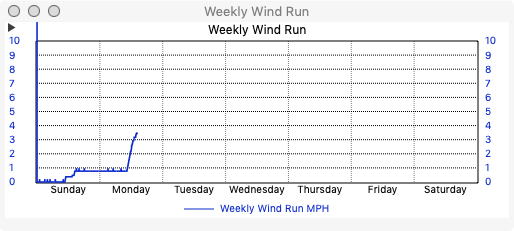


It gives you an idea of how stormy things have been.

The other has both ways of computing evapotranspiration:
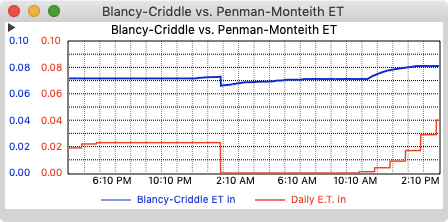


Unfortunately, it hasn't been as useful as I would have hoped.  It turns out that I cannot water as much as these graphs suggest.  Our water utility already considers us to be rather wasteful water users.

I do have the code for both if they are interesting.

What I would be really interested for is a graph or table or whatelse to show me for example:
ThisYearTemp (min/max/ave fixed graph beginning on 1.1. of the year) vs AllYearsTemp (min/max/ave fixed data from all the years of data before the current year).
Simply impossible?  :-\ :-[

At least off the top of my head, I cannot think of any way to do this.  However, you can use the STAT$ tag in synthetic channels.  If you can come up with a way to represent those two values with a STAT$ query, it might be possible.  I'll try to think about it some more to see if it can be done.  Certainly, it appears you should be able to create something like it and perhaps that would suffice.

Edouard

wurzelmac

  • Storm
  • *****
  • Posts: 1434
    • ITIROLPR2
    • Wetterstation Prägraten am Großvenediger
  • Station Details: Davis Vantage PRO2 Plus (24h fan aspirated, wireless) with UV/Solar | Weather Envoy Data Logger | Mac mini 2023 M2 8/256 | 1x Canon EOS 1100D | macOS Sonoma 15.0.1 | WC v330b300
Re: Custom Graphs Templates
« Reply #4 on: December 05, 2023, 11:03:21 AM »
Thanks John, thanks Edouard for inspiring me. Anybody else using gorgeous graphs?  [computer]
Reinhard


Steve

  • Global Moderator
  • Storm
  • *****
  • Posts: 1589
    • DW8454
    • KOHAVON11
    • Avon Weather
  • Station Details: Davis Wireless VP2 Plus w/24 hr FARS, 2023 Mac mini M2 Pro, 32GB RAM, Mac OS 15, WeatherCat 3.3
Re: Custom Graphs Templates
« Reply #5 on: December 05, 2023, 04:01:31 PM »

What I would be really interested for is a graph or table or whatelse to show me for example:
ThisYearTemp (min/max/ave fixed graph beginning on 1.1. of the year) vs AllYearsTemp (min/max/ave fixed data from all the years of data before the current year).
Simply impossible?  :-\ :-[

That would be an interesting metric! Sort of an annual version of our monthly statistics, i.e., 2023 was colder than average, drier than average, windier than average with appropriate numbers.
Steve - Avon, Ohio, USA


CWOP: DW8454 - WU: KOHAVON11 - AWEKAS
PWSweather - WeatherCloud - Facebook

wurzelmac

  • Storm
  • *****
  • Posts: 1434
    • ITIROLPR2
    • Wetterstation Prägraten am Großvenediger
  • Station Details: Davis Vantage PRO2 Plus (24h fan aspirated, wireless) with UV/Solar | Weather Envoy Data Logger | Mac mini 2023 M2 8/256 | 1x Canon EOS 1100D | macOS Sonoma 15.0.1 | WC v330b300
Re: Custom Graphs Templates
« Reply #6 on: December 08, 2023, 07:39:16 PM »
That would be an interesting metric! Sort of an annual version of our monthly statistics, i.e., 2023 was colder than average, drier than average, windier than average with appropriate numbers.

Would love it to visualize the collected data on a graph like this. The data is available within the tag STYEAROVERYEAR$, but is there a way to make a synthetic channel of only some data (TEMP MIN, AVE, MAX) out of it?

Stu, hear me calling?  [computer]  ;)
Reinhard


elagache

  • Global Moderator
  • Storm
  • *****
  • Posts: 6661
    • DW3835
    • KCAORIND10
    • Canebas Weather
  • Station Details: Davis Vantage Pro-2, Mac mini (2018), macOS 10.14.3, WeatherCat 3
Maybe with the STAT$ tag. (Re: Custom Graphs Templates)
« Reply #7 on: December 08, 2023, 11:08:46 PM »
Dear Reinhard, Steve, and WeatherCat info-o-holics

Would love it to visualize the collected data on a graph like this. The data is available within the tag STYEAROVERYEAR$, but is there a way to make a synthetic channel of only some data (TEMP MIN, AVE, MAX) out of it?

I believe you can get those values using the STAT$ tag which you can use in synthetic channels.  You can look up all the capabilities of the STAT$ tag starting on page 209 of the current WeatherCat manual.  Unfortunately, I already have all 5 of my synthetic channels being used for things I find useful.  So I really don't want to try to create something like this.  However, I can certainly offer advice as needed.

Edouard